Closed Beta Open for Android TV
Control Sonos from your TV remote.
Remos Player is an unofficial Sonos controller for Android TV and Google TV. Search your music services, pick a room and see what is playing, without reaching for your phone.
 From the developer of Kaset Player 50K+ downloads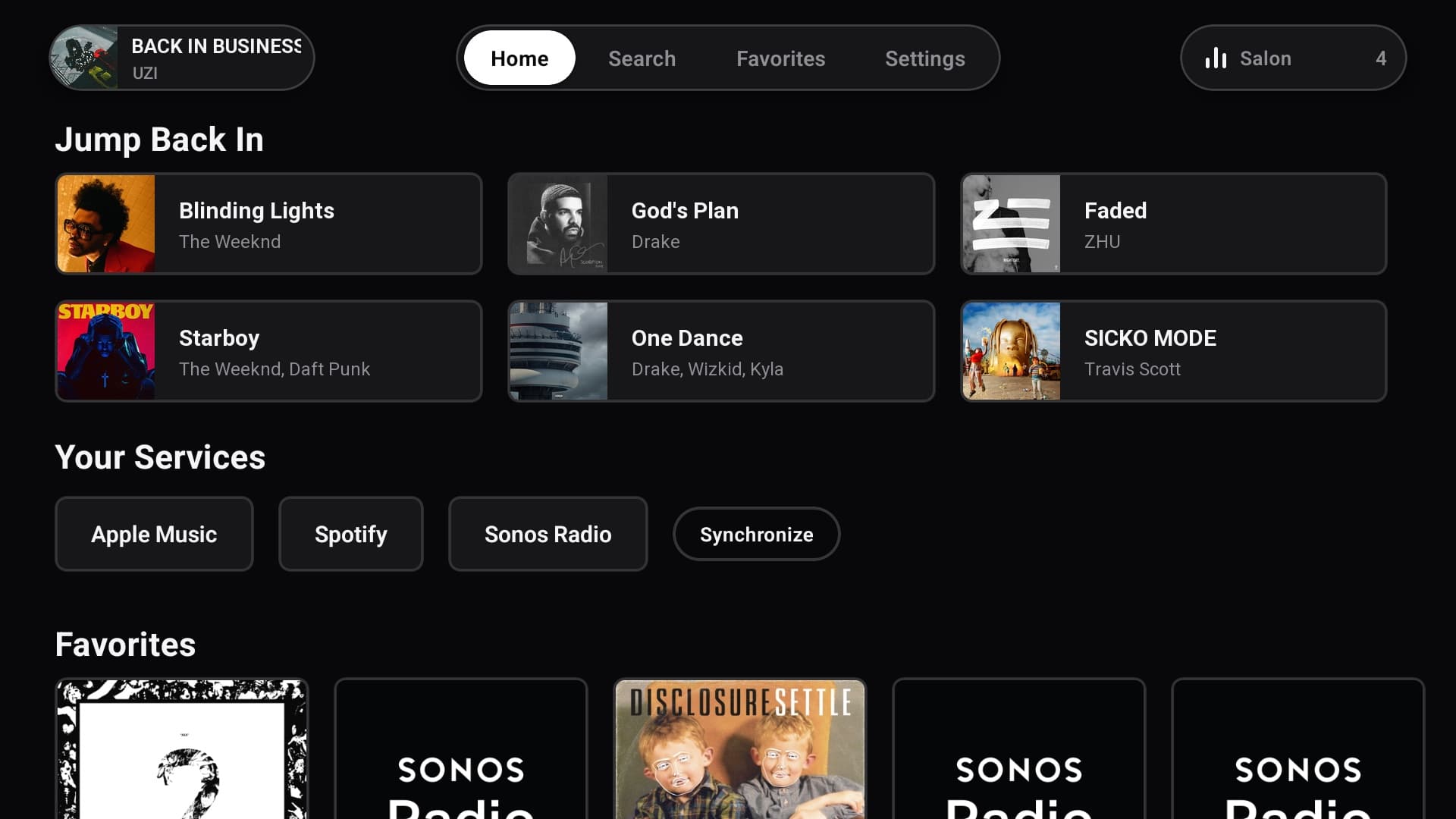
- Free for Life
- For the first 5 active testers who apply
- 12 Testers
- Stay opted in for 14 days
- No Account
- Runs on your home network
What It Does
Built for the soundbar under your TV. Everything runs between the TV and your speakers, on your own network.
Search Your Music Services
Browse and search Apple Music, Spotify, YouTube Music and Sonos Radio. Accounts you linked in the Sonos app are imported from the speaker, so there is nothing to log in to again.
Smart TV Autoplay
TV Autoplay normally switches your soundbar to TV audio on every interface click. SMART mode pauses it while the app is open and restores your setting when you leave.
Real Audio Quality
See what the speaker actually reports, like Lossless 24-Bit/48 kHz or Dolby Atmos, and the incoming format of the TV input.
Rooms as You Know Them
A home theater with surrounds and a sub is one room, not four speakers, exactly like the Sonos app shows it.
Only the Settings You Have
EQ, night mode, speech enhancement, sub and surround levels appear only when your speaker supports them. The app asks the speaker instead of guessing.
Made for the Remote
Full D-pad navigation, an on-screen keyboard, synced lyrics and type you can read from the couch.
What Is Planned
Rolling out during the beta, one update at a time. Tester feedback decides what comes first.
Apple TV Support
A tvOS version on the App Store, built for the Siri Remote.
Room Grouping
Group and ungroup speakers from the TV, without picking up your phone.
Queue Editing
Reorder the queue and remove songs right from the TV.
Sleep Timer
Stop the music after a set time, for when you fall asleep on the couch.
Remote Buttons in the Background
Play, pause and skip with your remote even while another app is open.
Home Screen Cards
What is playing, your favorites and recent music as native cards on the Android TV and Google TV home screen.
More Music Services
Search TIDAL, Amazon Music, Deezer and the other services you linked in the Sonos app.
More Languages
The interface in Turkish and other languages, not only English.
UI Polish
Better spacing, type sizes and many small fixes across every screen.
How the Closed Beta Works
Google Play needs 12 testers to stay in a closed test for 14 days before the app can go public. That is where you come in.
Join the Tester Group
Join the Google Group with the Google account that is signed in to Google Play on your TV. Google Play uses the group to decide who can install the beta.
Join the group(opens in a new tab)Become a Tester
Open the Google Play test link with the same Google account and accept the invitation.
Open the test link(opens in a new tab)Install from Google Play
Beta apps may not show up when you search the Play Store on your TV. Open the Google Play listing in a browser, tap Install and choose your TV as the device. It is free for everyone during the beta.
Can’t see it? Make sure you did the first two steps in order: join the group first, then become a tester, both with the Google account signed in to Google Play on your TV. If you are sure you did, it can take a few minutes for the Google Play page to become available to you. Wait a little, then open the Google Play link again.
Open on Google Play(opens in a new tab)Keep It Installed for 14 Days
Google Play only lets the app go public after 12 testers stay opted in for 14 days in a row. Use it as you like and report what breaks.
Want It Free After the Beta?
Apply with the form below. The first 5 testers who apply and use the app actively until the closed test ends keep it free for life.
Go to the form
You Will Need
- An Android TV or Google TV device (Chromecast with Google TV, NVIDIA Shield, Sony, TCL, Philips and others)
- Sonos S2 speakers on the same home network as the TV
- A Google account signed in to Google Play on that TV
- Optional: music services linked in the Sonos app, if you want to search them
What Testers Get
- The app is free for everyone during the beta, no application needed
- The first 5 testers who apply with the form and use the app actively until the test ends get it free for life, including any paid version later
- Your bug reports and requests shape what ships first
- Early access to every update before the public
Where It Is Headed
Now
Closed Beta
Android TV and Google TV, 12 testers.
Next
Google Play Release
Public release for Android TV and Google TV.
Later
Apple TV
A tvOS version on the App Store.
Keep It Free After the Beta
You do not need this form to join the beta. Apply here if you want to keep using Remos for free once it ends: the first 5 testers who apply and stay active until the closed test ends get it free for life.
Use the Google account you joined the tester group with. Your details are only used for the beta and are never shared.
Questions
Is this an official Sonos app?
No. It is an independent project and is not affiliated with or endorsed by Sonos, Inc. It talks to your speakers the same way the Sonos app does, over your local network.
Which speakers work?
Speakers on the Sonos S2 app. Development happens on a Beam (Gen 2) with Play:1 surrounds; the point of the beta is to try it on everything else. S1-only speakers are not supported.
Do I have to log in to Spotify or Apple Music again?
No. Tap Synchronize and the app imports the music services you already linked in the Sonos app, straight from the speaker.
Do I have to apply to join the beta?
No. Join the tester group, accept the Google Play test link and install the app. The form is only for keeping the app free after the beta ends.
What if all 5 free-for-life spots are taken?
The tester group stays open, so you can still join and use the app for free during the beta. The free-for-life spots go to the first 5 active testers who apply with the form.
What does free for life mean?
It applies to the first 5 testers who apply with the form and use the app actively until the closed test ends. The final pricing is not decided yet; whatever it ends up being, those Google accounts keep full access for free. Everyone else can use the app for free for as long as the beta runs.
Does the app send my data anywhere?
There is no account and no backend. The app talks to your speakers on your network, to the music services you search, and to LRCLIB for lyrics. Nothing else.
When is the Apple TV version coming?
After the Google Play release. There is no date yet.
What if a Sonos update breaks something?
It can happen, because the app relies on interfaces Sonos does not document. Report it with your speaker model and firmware version (Sonos app, Settings, System, About) and I will fix it.
Remos Player is an independent project. It is not affiliated with, endorsed by or sponsored by Sonos, Inc. Sonos is a trademark of Sonos, Inc. Android TV and Google Play are trademarks of Google LLC.